

FAQ Web relaunch
Everything you need to know about the relaunch of the University of Regensburg website.
FAQ on migration
What does the schedule look like?
The new homepage with the central websites and the pages of the Faculties of Biology and Preclinical Medicine and Real Estate took place on 17 July 2025. Other central institutions and faculties followed.
The final changeover of our university homepage from the old to the new system is imminent. Please ensure that all important content is migrated to the new TYPO3 system by 31 March 2026. On 1 April 2026, the pages will be redirected from the previous content management system to the new pages.
The new homepage runs on TYPO3 version 12, while the old homepage runs on an outdated TYPO3 version, which will be shut down in autumn 2026 for security reasons.
Important notes on the migration of web content
Notes for teams that are still migrating
If you are unable to fully complete the migration by the deadline, please concentrate on the essential and frequently used areas first.
The old system will remain accessible for web editors after 1 April 2026 via the address https://typo3.uni-regensburg.de/typo3 (external link, opens in a new window) for a transitional period. You can continue to view information there and add to this content in the new system.
Please note: Without access to the university network, this content will not be accessible - it will no longer be available to prospective students and other external visitors.
Notes for websites that are already in the new system
If your content has already been migrated, please check your links from 1 April 2026. Links to the old system could then lead to nothing or generate error messages.
Support
Servicedesk
If you have any queries regarding the changeover, please contact the Servicedesk via the Computer Center's ticket system.
Do I have to familiarise myself with a new CMS?
No, we are still using TYPO3. The new TYPO3 system is not very different from the current system, but there are some new content elements and functionalities.
Do I have to attend a TYPO3 training course?
Yes, the new TYPO3 system is not very different from the current system, but there are some new content elements, functionalities and legal notices.
We offer regular TYPO3 training sessions. This one-off training course lasts four hours. You can either join us virtually via Zoom or on site in the CIP-Pool. In addition, there is the option of repeating the topics in the self-study course. There you will also find information on the topics of accessibility and search engine optimisation. You will then receive a certificate of attendance.
As soon as you have attended the course, we can activate you so that you can set up and maintain your pages yourself.
to the TYPO3 courses (incl. self-study course) on GRIPS (external link, opens in a new window)
What do I need to consider when creating my page?
Accessibility
We are obliged to make our websites accessible. This means that the pages must be usable for people with disabilities. You can find out exactly what this means and what you need to bear in mind on the intranet:
Everything accessible: Accessibility on the web and in documents
Search engine optimisation (SEO)
To make your site easier to find by Google and other search engines (i.e. to be displayed as high up as possible in the search results), you should optimise your pages for search engines (SEO).
We explain how this works in a short SEO workshop for UR web editors.
How to access the SEO workshop video:
- Join the GRIPS course "Relaunch Typo 3 - Basics (self-study)".
- In module 9 you will find the video of the SEO workshop.
If you have any questions about SEO, please contact Annika Schuppe.
Questions and problems
Who do I contact if I have problems with TYPO3?
Technical questions about TYPO3:
In the event of technical problems, for example missing access rights, desired redirects and other questions, please contact the Computer Center's Servicedesk.
Editorial questions
If you have any editorial questions - e.g. "How can I hide a heading? Where can I find the download element again?", it is best to ask your question via the Zoom channel "Typo3 Relaunch". This channel is managed by the project team and questions will be answered within a day.
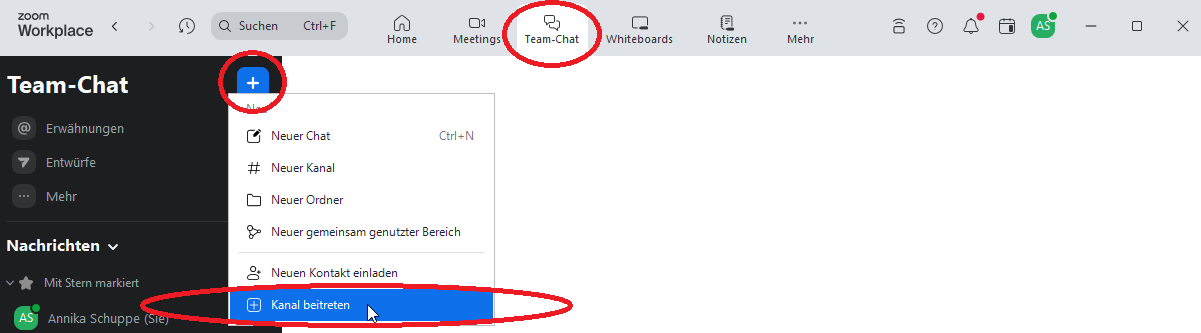
How to join the Zoom channel:
- Select the "Team chat" tab in the Zoom programme.
- Click on the blue plus symbol.
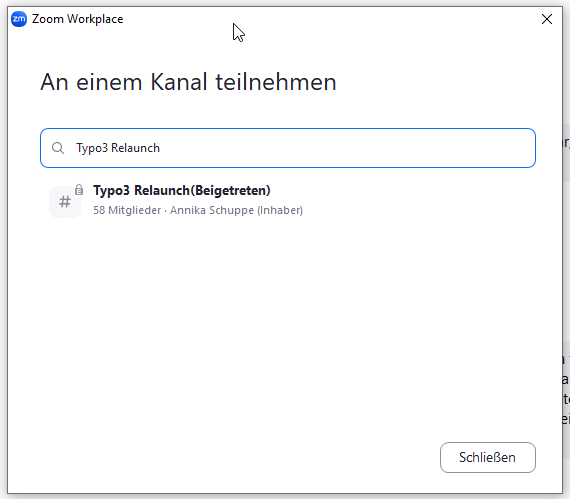
- Select "Join channel".
- Search for the channel name "Typo3 Relaunch".