

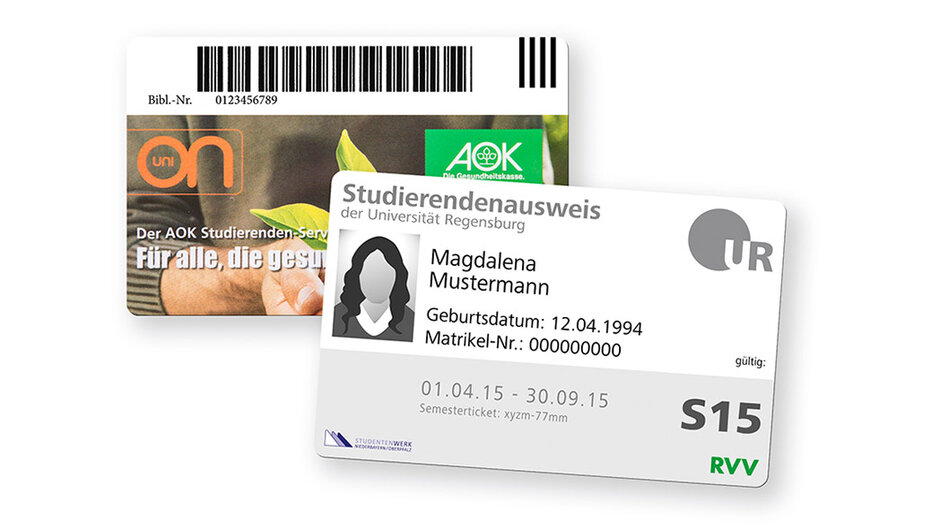
The Functions of the UR Card
The UR card identifies all students as members of the University of Regensburg with their surname, first name, date of birth, photograph and student number.
A barcode turns the card into a library card and an RVV number turns it into a semester ticket for local public transport. The UR card can also be used for cashless payments in the cafeterias and canteens of the Studierendenwerk and can be used to top up your printer and photocopier account.
Validate the UR card
After receiving your UR card, you must validate it at the terminals on campus before you can use your card. During validation, the period of validity (= 1 semester) of the card is printed on it.
At the end of a semester, after successful re-registration, you can validate and update your card for the following semester.
Please note: Without a validity date, your student ID card is invalid and cannot be used!
Re-registration and Re-validation
As soon as you have successfully re-registered at the end of the lecture period, you can have the validity of your UR card extended for the next semester at the validation terminal.
You can re-enrol by transferring your semester fee to the State University Cashier's Office during the last four weeks of lectures (please do not transfer it beforehand!). The exact period for re-registration and the amount of the semester fee can be found on the re-registration website. The Registrar's Office will also remind you of the deadline by circular email and inform you of the payment details. Therefore, please check your UR e-mail address regularly.
As a rule, the transfer for your re-registration will be booked within five working days, after which you can validate your UR card at the terminals for the next semester. You can see whether your payment has already been booked and the re-registration has been carried out in the SPUR student portal (external link, opens in a new window) (Login → SOS →Student data → Fee account).
Locations of the validation terminals
You will find the validation terminals at the following locations:
- Philosophie/Theologie: 1st floor by the examination secretariats, corridor area near room PT 1.1.1
- new Biology building: Room DE.0.129
- Physics building: in the area of the café bar
- Sports Center: by the gate
- Administration building: waiting area in front of the Registrar's Office
- Sammelgebäude: main entrance, in front of the reading room
- University Hospital: Building H5, Room 1.22 (Library)
Additional Functions of the UR Card
Library Card
The UR card is also your library card. You will find your user number (library no.) on the back of the UR card below the barcode. To order media in the library catalogue (external link, opens in a new window), you must log in with your user number and password. The default password is your date of birth in four-digit form (TTMM).
more information about the library card (external link, opens in a new window)
Printer or Copy Credit
You can top up your printer or copier account at the validation terminals using the UR card.
The first step is to log in to the PaperCut web portal (external link, opens in a new window) and agree to the privacy policy!
To top up your PaperCut account, the second step is to visit a validator. Touch the touch screen of the validator. The screen for purchasing the sports card will appear. Please press the "Purchase printer and copy coupon level" button at the bottom left.
You can now transfer a credit to your Papercut account at "Print and copy costs level". You can choose between amounts of € 2, € 5 or € 10.
Please select the desired amount for the transfer. Then hold the UR card up to the card reader in the front area of the validator and press the "Buchung auslösen" button.
The UR card does NOT need to be revalidated (printed) after the transfer.
Instructions in PDF format | German version (opens in a new window). (This PDF is not accessible)
Mensa Card
You can use your UR card to pay contactless and at a discounted student rate in the canteens and cafeterias of the Studierendenwerk Niederbayern/Oberpfalz (STWNO). Simply hold your card up to the reader available at every checkout.
To be able to use the payment function, you must first top up your card with credit at the Studierendenwerk top-up machines. Please note: These are NOT the validation terminals of the UR. To top up, hold your UR card (or your wallet including card) in front of the reader. You can read off your current credit balance and increase your credit by topping up. At the end of the transaction, the new balance will be displayed.
You cannot top up your card at the cash desks in the cafeterias and canteens. Alternatively, you can pay with your EC card. It is not possible to pay with cash in the Studierendenwerk facilities.
Reimbursement of remaining credit
After completing your studies, you can have any remaining credit refunded at the Studierendenwerk canteen card office.
If you wish to de-register with immediate effect, please have the remaining balance refunded beforehand , as you will have to hand in your UR card in this case.
Further information can be found on the STWNO homepage (external link, opens in a new window).
RVV Semester Ticket
Only validated and legible student ID cards are recognised as valid RVV tickets. The actual period of validity must be clearly recognisable on the ID cards. Without a valid ticket, the RVV may charge a higher fare.
If you would like to upgrade your RVV semester ticket to a Deutschlandticket, you can do so via the Regensburger Verkehrsverbund website (external link, opens in a new window). You will receive your ticket monthly by e-mail as a wallet link, which you can use to save the ticket directly on your smartphone.
Loss or Defect of the UR Card
If you have lost your card, you can first block your credit for the canteens and cafeterias. Please contact the Studierendenwerk Niederbayern/Oberpfalz (external link, opens in a new window). You can enquire at the UR lost property office whether your card has been found.
If your card is defective or lost, you can have a new UR card issued for a fee. The Registrar's Office is the point of contact for this. Proceed as follows:
- Firstly, please upload a suitable photo for the student ID card via SPUR, via:
"Mein Studium" → "Studienservice" → "Bilder". - Transfer the fee of €10 for the reissue of the UR card to the following account
account holder: Staatsoberkasse Bayern Landshut
iBAN: DE50700500000901279276
financial institution: Bayerische Landesbank München
bIC: BYLADEMM
purpose: Ersatz UR-Karte, first name, surname, date of birth - Please contact the Registrar 's Office team by e-mail at studierendenkanzlei(at)ur.de. Please attach proof of payment for the fee of € 10 for reissuing the UR card to your e-mail.
- The Registrar's Office will then send you a new card to the address you provided in SPUR.
Please update this address in advance if necessary. - If you would like to collect the UR card from us at the university during our opening hours, you must explicitly state this in your e-mail. We will notify you by e-mail as soon as the UR card is ready for collection.