

E-Media Access
Some e-books, e-journal articles and databases are available free of charge.
Fee-based e-media licensed by the University Library of Regensburg are only available within the campus network .
How can I access e-media from the library catalog?
Licensed e-books in the tab “Books & Journals”
Licensed e-books can be recognised by the button:

Free e-books in the tab “Books & Journals”
You can filter for free e-books in the catalog and recognise them by the icon:

E-media from "Articles & More"
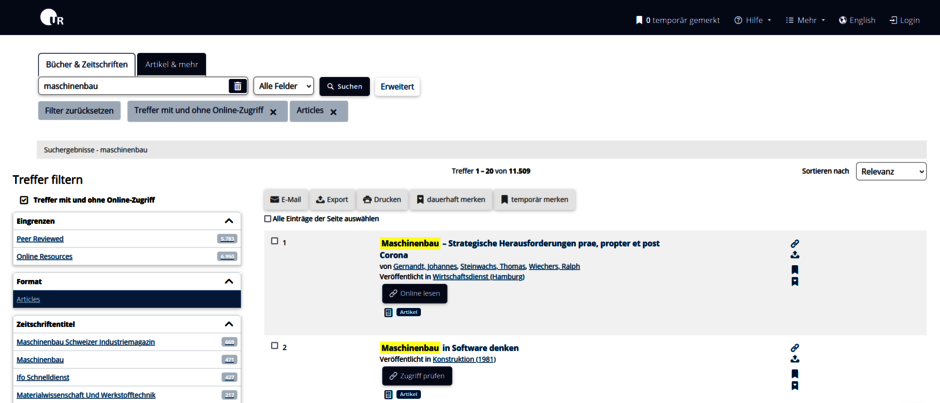
In the tab "Articles & More" in the library catalog, you will initially find hits that have online access. You can click at the box on the left to also display hits without online access.
If an article is available online, you can access it by clicking on the button “Read online”. Some articles are available free of charge, others are licensed for the campus network.
If an article is not available online, the button "Request full text" will open the SFX (external link, opens in a new window) service. If online access is available elsewhere, you will find the link here.
You can use the link to check whether the journal is available in printed form at the University Library of Regensburg or to order a copy via inter-library loan.
If you have any questions, please contact the information desk.
How do I get literature from databases?
In many databases, publications can be read and downloaded online.
If this is not possible, you will find the SFX (external link, opens in a new window) service in many databases. This allows you to check whether the publication is available online or in print at the University Library.
If the publication is not available in any Regensburg library, you can order the book or a copy of a journal article via inter-library loan.
If you have any questions about databases, you can contact the information desk or the subject librarians for the relevant subjects.
Campus network of the UR
University members
- Students and staff can use the computer rooms on campus.
- You can use the WiFi “Eduroam” on campus.
- You can use VPN outside the university.
- Outside the university, you can log in to some publishers directly on the publisher's website with a Computer Center account (Shibboleth).
- Tutorial ▶ How can I use e-media?
External users
You can use licensed e-media from the University Library on a Computer in the Information Center and usually download is possible (to your own USB stick). Please register at the information desk during opening hours.
Members of the OTH and other universities
An electronic registration procedure is available for enrolled students from other state universities: https: //wgm.app.uni-regensburg.de/extedu.phtml (external link, opens in a new window)
Here you can apply for a Computer Center account, log in to all CIP-Pool PCs on campus and use the University Library's e-media.
Alternatively, you can use licensed e-media from the University Library on a computer in the Information Center and usually download them (to your own USB stick). Register at the information desk during opening hours.
Campus network of the OTH
University members
Licensed e-media from the OTH library can be used within the campus network of the Ostbayerische Technische Hochschule (OTH). Log in on site at the OTH with your Computer Center account on a computer in the computer rooms.
External users
Licensed OTH e-media can be used on a computer at the OTH library and usually downloaded (to your own USB stick). Register at the counter at the OTH library during service hours.